# JavaScript DOM 基础部分# 什么是 DOM文档对象模型 (Document Object Model, 简称 DOM ), 是 W3C 组织推荐的处理可扩展标记语言 (HTML 或 XML) 的标准接口
W3C 已经定义了一系列的 DOM 接口,通过这些 DOM 接口可以改变网页的内容,结构和样式
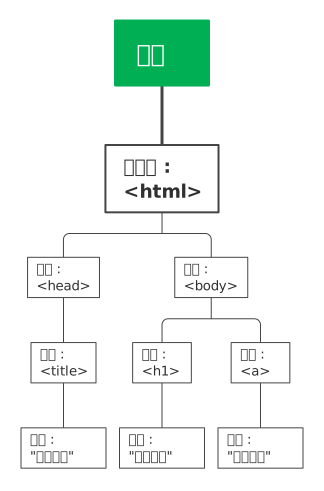
# DOM 树
文档:一个页面就是一个文档,DOM 中使用 document 表示
元素:页面中的所有的标签都是元素,DOM 中使用 element 表示
节点:网页中的所有内容都是节点 (标签,属性,文本,注释等), DOM 中使用 node 表示
==DOM 八以上内容都看作为对象 ==
# 获取元素# 根据 ID 获取使用 getElementById () 方法可以获取带有 ID 的元素对象
1
2
3
4
5
6
7
8
9
10
11
12
13
14
15
16
17
18
19
20
21
22
23
24
25
26
27
28
29
30
31
32
33
34
35
36
37
38
39
40
41
42
43
44
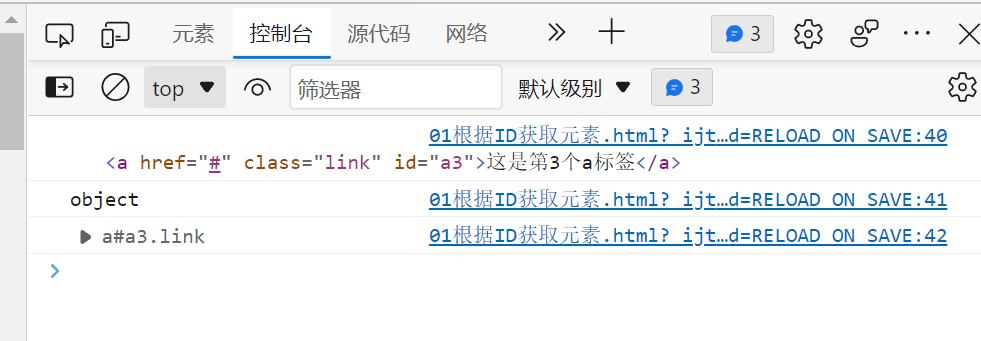
<!DOCTYPE html > <html lang ="en" > <head > <meta charset ="UTF-8" > <meta http-equiv ="X-UA-Compatible" content ="IE=edge" > <meta name ="viewport" content ="width=device-width, initial-scale=1.0" > <title > 根据ID获取元素</title > <style > * { margin : 0 ; padding : 0 ; } .link { text-decoration : none; color : black; display : inline-block; font-size : 30px ; float : left; background-color : pink; width : 300px ; height : 300px ; text-align : center; line-height : 300px ; margin : 3px ; box-sizing : border-box; } </style > </head > <body > <div > <a href ="#" class ="link" id ="a1" > 这是第1个a标签</a > <a href ="#" class ="link" id ="a2" > 这是第2个a标签</a > <a href ="#" class ="link" id ="a3" > 这是第3个a标签</a > <a href ="#" class ="link" id ="a4" > 这是第4个a标签</a > <a href ="#" class ="link" id ="a5" > 这是第5个a标签</a > </div > </body > <script > var timer = document.getElementById('a3'); console.log(timer); console.log(typeof timer); console.dir(timer); </script > </html >
console.dir 打印返回的元素对象,更好的查看里面的属性和方法
# 根据标签名获取使用 getElementsByTagName () 方法可以返回带有指定标签名的对象的集合
1
2
3
4
5
6
7
8
9
10
11
12
13
14
15
16
17
18
19
20
21
22
23
24
25
26
27
28
29
30
31
32
33
34
35
36
37
38
39
40
41
42
43
44
45
46
47
48
49
50
51
52
53
54
55
56
57
58
59
60
61
62
63
64
65
66
67
68
69
70
71
72
73
74
75
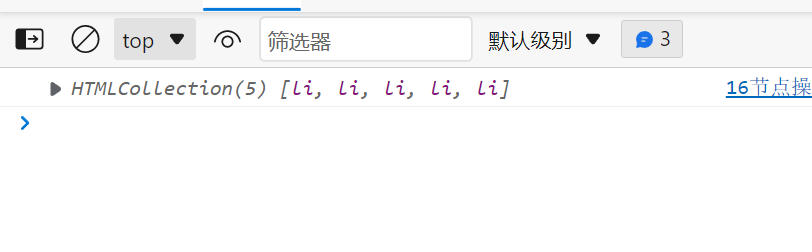
<!DOCTYPE html > <html lang ="en" > <head > <meta charset ="UTF-8" > <meta http-equiv ="X-UA-Compatible" content ="IE=edge" > <meta name ="viewport" content ="width=device-width, initial-scale=1.0" > <title > 根据ID获取元素</title > <style > * { margin : 0 ; padding : 0 ; } .link { text-decoration : none; color : black; display : inline-block; font-size : 30px ; float : left; background-color : pink; width : 300px ; height : 300px ; text-align : center; line-height : 300px ; margin : 3px ; box-sizing : border-box; } .list { list-style : none; display : inline-block; } </style > </head > <body > <div > <a href ="#" class ="link" id ="a1" > 这是第1个a标签</a > <a href ="#" class ="link" id ="a2" > 这是第2个a标签</a > <a href ="#" class ="link" id ="a3" > 这是第3个a标签</a > <a href ="#" class ="link" id ="a4" > 这是第4个a标签</a > <a href ="#" class ="link" id ="a5" > 这是第5个a标签</a > <ul class ="list" id ="list1" > <li > 我是第1个li标签</li > <li > 我是第2个li标签</li > <li > 我是第3个li标签</li > <li > 我是第4个li标签</li > <li > 我是第5个li标签</li > </ul > <ol class ="list" id ="list2" > <li > 我是第1个标签</li > <li > 我是第2个标签</li > <li > 我是第3个标签</li > <li > 我是第4个标签</li > <li > 我是第5个标签</li > </ol > </div > </body > <script > var timer = document .getElementsByTagName ('a' ); console .log (timer); console .log (timer[3 ]); console .log ('依次打印' ); for (var i = 0 ; i < timer.length ; i++) { console .log (timer[i]); } var li = document .getElementsByTagName ('li' ); console .log (li); var ol = document .getElementsByTagName ('ol' ); console .log (ol[0 ].getElementsByTagName ('li' )); </script > </html >
# 通过类名获取元素 (HTML5 新增)document.getElementsByClassName()
1
2
3
4
5
6
7
8
9
10
11
12
13
14
15
16
17
18
19
20
21
22
23
24
25
26
27
28
29
30
31
32
33
34
35
36
37
38
39
40
41
42
43
44
45
46
47
48
49
50
51
52
53
54
55
56
57
58
59
60
61
62
63
<!DOCTYPE html > <html lang ="en" > <head > <meta charset ="UTF-8" > <meta http-equiv ="X-UA-Compatible" content ="IE=edge" > <meta name ="viewport" content ="width=device-width, initial-scale=1.0" > <title > 根据ID获取元素</title > <style > * { margin : 0 ; padding : 0 ; } .link { text-decoration : none; color : black; display : inline-block; font-size : 30px ; float : left; background-color : pink; width : 300px ; height : 300px ; text-align : center; line-height : 300px ; margin : 3px ; box-sizing : border-box; } .list { list-style : none; display : inline-block; } </style > </head > <body > <div > <a href ="#" class ="link" id ="a1" > 这是第1个a标签</a > <a href ="#" class ="link" id ="a2" > 这是第2个a标签</a > <a href ="#" class ="link" id ="a3" > 这是第3个a标签</a > <a href ="#" class ="link" id ="a4" > 这是第4个a标签</a > <a href ="#" class ="link" id ="a5" > 这是第5个a标签</a > <ul class ="list" id ="list1" > <li > 我是第1个li标签</li > <li > 我是第2个li标签</li > <li > 我是第3个li标签</li > <li > 我是第4个li标签</li > <li > 我是第5个li标签</li > </ul > <ol class ="list" id ="list2" > <li > 我是第1个标签</li > <li > 我是第2个标签</li > <li > 我是第3个标签</li > <li > 我是第4个标签</li > <li > 我是第5个标签</li > </ol > </div > </body > <script > var list = document .getElementsByClassName ('list' ); console .log (list); </script > </html >
# 根据指定选择器返回第一个元素对象 (HTML5 新增)document.querySelector (‘选择器’)
1 2 3 4 5 6 7 8 9 10 11 12 13 14 15 16 17 18 19 20 21 22 23 24 25 26 27 28 29 30 31 32 33 34 35 36 37 38 39 40 41 42 43 44 45 46 47 48 49 50 51 52 53 54 55 56 57 58 59 60 61 62 63 64 65 66 <!DOCTYPE html> <html lang="en"> <head> <meta charset="UTF-8"> <meta http-equiv="X-UA-Compatible" content="IE=edge"> <meta name="viewport" content="width=device-width, initial-scale=1.0"> <title>根据ID获取元素</title> <style> * { margin: 0; padding: 0; } .link { text-decoration: none; color: black; display: inline-block; font-size: 30px; float: left; background-color: pink; width: 300px; height: 300px; text-align: center; line-height: 300px; margin: 3px; box-sizing: border-box; } .list { list-style: none; display: inline-block; } </style> </head> <body> <div> <a href="#" class="link" id="a1">这是第1个a标签</a> <a href="#" class="link" id="a2">这是第2个a标签</a> <a href="#" class="link" id="a3">这是第3个a标签</a> <a href="#" class="link" id="a4">这是第4个a标签</a> <a href="#" class="link" id="a5">这是第5个a标签</a> <ul class="list" id="list1"> <li>我是第1个li标签</li> <li>我是第2个li标签</li> <li>我是第3个li标签</li> <li>我是第4个li标签</li> <li>我是第5个li标签</li> </ul> <ol class="list" id="list2"> <li>我是第1个标签</li> <li>我是第2个标签</li> <li>我是第3个标签</li> <li>我是第4个标签</li> <li>我是第5个标签</li> </ol> </div> </body> <script> var link = document.querySelector('.link'); console.log(link); var list = document.querySelector('#list1'); console.log(list); </script> </html>
# 根据指定选择器返回 (HTML5 新增)document.querySelectorALL (‘选择器’)
1
2
3
4
5
6
7
8
9
10
11
12
13
14
15
16
17
18
19
20
21
22
23
24
25
26
27
28
29
30
31
32
33
34
35
36
37
38
39
40
41
42
43
44
45
46
47
48
49
50
51
52
53
54
55
56
57
58
59
60
61
62
63
64
65
<!DOCTYPE html > <html lang ="en" > <head > <meta charset ="UTF-8" > <meta http-equiv ="X-UA-Compatible" content ="IE=edge" > <meta name ="viewport" content ="width=device-width, initial-scale=1.0" > <title > 根据ID获取元素</title > <style > * { margin : 0 ; padding : 0 ; } .link { text-decoration : none; color : black; display : inline-block; font-size : 30px ; float : left; background-color : pink; width : 300px ; height : 300px ; text-align : center; line-height : 300px ; margin : 3px ; box-sizing : border-box; } .list { list-style : none; display : inline-block; } </style > </head > <body > <div > <a href ="#" class ="link" id ="a1" > 这是第1个a标签</a > <a href ="#" class ="link" id ="a2" > 这是第2个a标签</a > <a href ="#" class ="link" id ="a3" > 这是第3个a标签</a > <a href ="#" class ="link" id ="a4" > 这是第4个a标签</a > <a href ="#" class ="link" id ="a5" > 这是第5个a标签</a > <ul class ="list" id ="list1" > <li > 我是第1个li标签</li > <li > 我是第2个li标签</li > <li > 我是第3个li标签</li > <li > 我是第4个li标签</li > <li > 我是第5个li标签</li > </ul > <ol class ="list" id ="list2" > <li > 我是第1个标签</li > <li > 我是第2个标签</li > <li > 我是第3个标签</li > <li > 我是第4个标签</li > <li > 我是第5个标签</li > </ol > </div > </body > <script > var links = document .querySelectorAll ('.link' ); console .log (links); var lists = document .querySelectorAll ('.list' ); console .log (lists); </script > </html >
# 获取特殊元素 (body, html)获取 body : document.body
获取 html : document.documentElement
1
2
3
4
5
6
7
8
9
10
11
12
13
14
15
16
17
18
19
20
21
22
23
24
25
26
27
28
29
30
31
32
33
34
35
36
37
38
39
40
41
42
43
44
45
46
47
48
49
50
51
52
53
54
55
56
57
58
59
60
61
62
63
<!DOCTYPE html > <html lang ="en" > <head > <meta charset ="UTF-8" > <meta http-equiv ="X-UA-Compatible" content ="IE=edge" > <meta name ="viewport" content ="width=device-width, initial-scale=1.0" > <title > 根据ID获取元素</title > <style > * { margin : 0 ; padding : 0 ; } .link { text-decoration : none; color : black; display : inline-block; font-size : 30px ; float : left; background-color : pink; width : 300px ; height : 300px ; text-align : center; line-height : 300px ; margin : 3px ; box-sizing : border-box; } .list { list-style : none; display : inline-block; } </style > </head > <body > <div > <a href ="#" class ="link" id ="a1" > 这是第1个a标签</a > <a href ="#" class ="link" id ="a2" > 这是第2个a标签</a > <a href ="#" class ="link" id ="a3" > 这是第3个a标签</a > <a href ="#" class ="link" id ="a4" > 这是第4个a标签</a > <a href ="#" class ="link" id ="a5" > 这是第5个a标签</a > <ul class ="list" id ="list1" > <li > 我是第1个li标签</li > <li > 我是第2个li标签</li > <li > 我是第3个li标签</li > <li > 我是第4个li标签</li > <li > 我是第5个li标签</li > </ul > <ol class ="list" id ="list2" > <li > 我是第1个标签</li > <li > 我是第2个标签</li > <li > 我是第3个标签</li > <li > 我是第4个标签</li > <li > 我是第5个标签</li > </ol > </div > </body > <script > console .log (document .body ); console .log (document .documentElement ); </script > </html >
# 事件JavaScript 使我们有能力创建动态页面,而事件是可以被 JavaScript 侦测到的行为
简单理解:触发 —— 响应机制
网页中的每个元素都可以产生某些可以除法 JavaScript 的事件,例如,我们可以在用户点击某按钮时产生一个事件,然后去执行某些操作
# 事件三要素# 事件源事件被触发的对象
1 var bin = document .getElementById ('a1' )
# 事件类型如何触发,什么事件,比如鼠标点击 (onclick), 还是鼠标经过,还是键盘按下
# 事件处理程序通过一个函数赋值的方式完成
1
2
3
4
5
6
7
8
9
10
11
12
13
14
15
16
17
18
19
20
21
22
23
24
25
26
27
28
29
30
31
32
33
34
35
36
37
38
39
40
41
42
43
44
45
46
47
48
49
50
51
52
53
54
55
56
57
58
59
60
61
62
63
64
65
<!DOCTYPE html > <html lang ="en" > <head > <meta charset ="UTF-8" > <meta http-equiv ="X-UA-Compatible" content ="IE=edge" > <meta name ="viewport" content ="width=device-width, initial-scale=1.0" > <title > 根据ID获取元素</title > <style > * { margin : 0 ; padding : 0 ; } .link { text-decoration : none; color : black; display : inline-block; font-size : 30px ; float : left; background-color : pink; width : 300px ; height : 300px ; text-align : center; line-height : 300px ; margin : 3px ; box-sizing : border-box; } .list { list-style : none; display : inline-block; } </style > </head > <body > <div > <a href ="#" class ="link" id ="a1" > 这是第1个a标签</a > <a href ="#" class ="link" id ="a2" > 这是第2个a标签</a > <a href ="#" class ="link" id ="a3" > 这是第3个a标签</a > <a href ="#" class ="link" id ="a4" > 这是第4个a标签</a > <a href ="#" class ="link" id ="a5" > 这是第5个a标签</a > <ul class ="list" id ="list1" > <li > 我是第1个li标签</li > <li > 我是第2个li标签</li > <li > 我是第3个li标签</li > <li > 我是第4个li标签</li > <li > 我是第5个li标签</li > </ul > <ol class ="list" id ="list2" > <li > 我是第1个标签</li > <li > 我是第2个标签</li > <li > 我是第3个标签</li > <li > 我是第4个标签</li > <li > 我是第5个标签</li > </ol > </div > </body > <script > links = document .getElementById ('list1' ); links.onclick = function ( alert ('hello' ); } </script > </html >
# 执行事件的步骤获取事件源
document.getElement…
注册事件 (绑定事件)
常见的鼠标事件
鼠标事件 触发条件 conclick 鼠标点击左键触发 onmouseover 鼠标经过触发 (经过子盒子也触发) onmouseout 鼠标离开触发 onfocus 获得鼠标焦点触发 onblur 失去鼠标焦点触发 onmousemove 鼠标移动触发 onmouseup 鼠标弹起触发 onmousedown 鼠标按下触发 onmouseenter 鼠标经过触发 (经过子盒子不会触发) onmouseleave 鼠标离开触发 (经过子盒子不会触发)
添加事件处理程序 (采取函数赋值形式)
# 操作元素JavaScript 的 DOM 操作可以改变网页内容,结构和样式,我们可以利用 DOM 操作元素来改变元素里面的内容,属性等,注意一下都是属性
# 修改元素内容# element.innerText从起始位置到终止位置的内容,但它去除 html 标签,同时空格和换行也会去掉
1
2
3
4
5
6
7
8
9
10
11
12
13
14
15
16
17
18
19
20
21
22
23
24
25
<!DOCTYPE html > <html lang ="en" > <head > <meta charset ="UTF-8" > <title > 改变元素内容</title > <style > .box { width : 300px ; height : 300px ; background-color : orange; } </style > </head > <body > <input type ="button" value ="点我" > <div class ="box" > </div > </body > <script > var button = document .querySelector ('input' ); var div = document .querySelector ('.box' ); button.onclick = function ( div.innerText = 'hello' } </script > </html >
# element.innerHTML从起始位置到终止位置的全部内容,包括 html 标签,同时保留空格和换行
1
2
3
4
5
6
7
8
9
10
11
12
13
14
15
16
17
18
19
20
21
22
23
24
25
<!DOCTYPE html > <html lang ="en" > <head > <meta charset ="UTF-8" > <title > 改变元素内容</title > <style > .box { width : 300px ; height : 300px ; background-color : orange; } </style > </head > <body > <input type ="button" value ="点我" > <div class ="box" > </div > </body > <script > var button = document .querySelector ('input' ); var div = document .querySelector ('.box' ); button.onclick = function ( div.i = 'hello' } </script > </html >
# innerText 和 innerHTML 标签区别innerText 不识别 html 标签,而 innerHTML 识别
innerText 非标准,而 innerHTML 是 W3C 标准
innerText 去除空格和换行,innerHTML 保留空格和换行
1
2
3
4
5
6
7
8
9
10
11
12
13
14
15
16
17
18
19
20
21
22
23
24
25
26
27
28
29
30
31
32
<!DOCTYPE html > <html lang ="en" > <head > <meta charset ="UTF-8" > <title > 改变元素内容</title > <style > .box { width : 300px ; height : 300px ; background-color : orange; } </style > </head > <body > <input type ="button" value ="点我" > <div class ="box" > </div > <p > hello <span > 123</span > </p > </body > <script > var button = document .querySelector ('input' ); var div = document .querySelector ('.box' ); button.onclick = function ( div.innerText = 'hello' } var p = document .querySelector ('p' ); console .log (p.innerText ); console .log (p.innerHTML ); </script > </html >
# 修改元素属性1 2 3 4 5 6 7 8 9 10 11 12 13 14 15 16 17 18 19 20 21 22 23 24 25 26 27 28 29 30 31 32 33 <!DOCTYPE html > <html lang ="en" > <head > <meta charset ="UTF-8" > <title > 修改属性案例</title > </head > <body > <img src ="./black.png" alt ="black.png" > </body > <script > var date = new Date (); var img = document .querySelector ('img' ); if (date.getHours () >= 12 && date.getHours () <= 18 ) { img.src = './white.png' ; alert ('下午好' ); } else if (date.getHours () >= 18 && date.getHours () < 24 ) { img.src = './black.png' ; alert ('晚上好' ); } else if (date.getHours () >= 0 && date.getHours () < 7 ) { img.src = './white.png' ; alert ('凌晨好' ); } else if (date.getHours () >= 7 && date.getHours () < 12 ) { img.src = './white.png' ; alert ('早上好' ); } </script > </html >
# 修改表单元素表单里的值,文字内容是通过 value 属性来修改的
1
2
3
4
5
6
7
8
9
10
11
12
13
14
15
16
17
18
19
20
<!DOCTYPE html > <html lang ="en" > <head > <meta charset ="UTF-8" > <title > 表单属性修改</title > </head > <body > <input type ="text" value ="请输入内容" > </body > <script > var input = document .querySelector ('input' ); input.onclick = function ( input.value = "" ; } input.onblur = function ( input.value = "请输入内容" ; } </script > </html >
密码显示与关闭
方法一
1 2 3 4 5 6 7 8 9 10 11 button.onclick = function ( if (flag === 1 ) { flag = 0 ; input.type = 'password' ; } else if (flag === 0 ) { flag = 1 ; input.type = 'text' ; } }
方法二 :
1
2
3
4
5
6
7
8
9
10
var flag = 0 ;var input = document .querySelector ('input' );var button = document .querySelector ('button' );button.onmouseover = function ( input.type = 'text' ; } button.onmouseout = function ( input.type = 'password' ; }
# 修改样式属性1 2 3 4 5 6 7 8 9 10 11 12 13 14 15 16 17 18 19 20 21 22 23 24 25 26 27 28 29 30 31 32 33 34 35 36 37 38 39 40 <!DOCTYPE html > <html lang ="en" > <head > <meta charset ="UTF-8" > <title > 关闭二维码</title > <style > .box { float : left; box-sizing : border-box; } #one { width : 10px ; height : 10px ; } .close { float : left; } </style > </head > <body > <div class ="box" > <img src ="./black.png" alt ="black.png" id ="two" > <div class ="close" > <img src ="./white.png" alt ="white.png" id ="one" > </div > </div > </body > <script > var box = document .querySelector ('.box' ); var close = document .querySelector ('.close' ); close.onclick = function ( this .style .display = 'none' ; box.style .display = 'none' ; } </script > </html >
# 显示文本内容1 2 3 4 5 6 7 8 9 10 11 12 13 14 15 16 17 18 19 20 21 22 23 24 25 26 27 28 29 30 31 32 <!doctype html > <html lang ="en" > <head > <meta charset ="UTF-8" > <meta name ="viewport" content ="width=device-width, user-scalable=no, initial-scale=1.0, maximum-scale=1.0, minimum-scale=1.0" > <meta http-equiv ="X-UA-Compatible" content ="ie=edge" > <title > 显示文本框内容</title > <style > .search { width : 200px ; height : 40px ; color : grey; } </style > </head > <body > <label > <input type ="text" class ="search" value ="请输入内容" > </label > </body > <script > var search = document .querySelector ('.search' ); search.onfocus = function ( this .value = '' ; } search.onblur = function ( this .value = '请输入内容' ; } </script > </html >
# 批量修改样式属性element.className 类名样式操作
1
2
3
4
5
6
7
8
9
10
11
12
13
14
15
16
17
18
19
20
21
22
23
24
25
26
27
<!doctype html > <html lang ="en" > <head > <meta charset ="UTF-8" > <meta name ="viewport" content ="width=device-width, user-scalable=no, initial-scale=1.0, maximum-scale=1.0, minimum-scale=1.0" > <meta http-equiv ="X-UA-Compatible" content ="ie=edge" > <title > 批量修改样式操作</title > <style > .change { width : 300px ; height : 300px ; font-size : 30px ; background-color : pink; } </style > </head > <body > <div > hello my world!!!</div > </body > <script > var change = document .querySelector ('div' ); change.onclick = function ( this .className = 'change' ; } </script > </html >
# 密码框验证信息1 2 3 4 5 6 7 8 9 10 11 12 13 14 15 16 17 18 19 20 21 22 23 24 25 26 27 28 29 30 31 32 33 34 35 36 37 38 39 40 41 42 43 44 45 46 47 48 49 50 51 52 53 54 55 56 57 <!DOCTYPE html > <html lang ="en" > <head > <meta charset ="UTF-8" > <title > 密码框验证信息</title > <style > .box { width : 400px ; height : 300px ; background-color : pink; } .psswd { width : 200px ; height : 40px ; color : grey; } .notice { color : grey; width : 200px ; height : 30px ; line-height : 30px ; font-size : 10px ; display : inline; } .noticeRed { color : red; width : 200px ; height : 30px ; line-height : 30px ; font-size : 10px ; display : inline; } </style > </head > <body > <div class ="box" > <input type ="password" class ="psswd" placeholder ="请输入密码" > <p class ="notice" > 请输入6位以上, 10位以下密码</p > </div > </body > <script > var passwd = document .querySelector ('.psswd' ); var notice = document .querySelector ('.notice' ); passwd.onblur = function ( if (this .value !== '' && (this .value .length <= 6 || this .value .length >= 10 )) { notice.className = 'noticeRed' ; } else { notice.className = 'notice' ; } } </script > </html >
# 排他事件1 2 3 4 5 6 7 8 9 10 11 12 13 14 15 16 17 18 19 20 21 22 23 24 25 26 <!DOCTYPE html > <html lang ="en" > <head > <meta charset ="UTF-8" > <title > 排他事件</title > </head > <body > <button > 按钮1</button > <button > 按钮2</button > <button > 按钮3</button > <button > 按钮4</button > <button > 按钮5</button > </body > <script > var btns = document .getElementsByTagName ('button' ); for (var i = 0 ; i < btns.length ; i++) { btns[i].onfocus = function ( console .log (11 ); for (var i = 0 ; i < btns.length ; i++) { btns[i].style .backgroundColor = '' ; } this .style .backgroundColor = 'pink' ; } } </script > </html >
# 表格隔行变色效果1 2 3 4 5 6 7 8 9 10 11 12 13 14 15 16 17 18 19 20 21 22 23 24 25 26 27 28 29 30 31 32 33 34 35 36 37 38 39 40 41 42 43 44 45 46 47 48 49 50 51 52 53 54 55 56 57 58 59 60 61 62 63 64 65 66 67 68 69 70 71 72 73 74 75 76 77 78 79 80 81 82 83 84 85 86 87 88 89 90 91 92 93 94 95 96 97 98 99 100 101 102 103 104 105 106 107 108 109 110 111 112 113 114 115 116 117 118 119 120 121 122 123 124 125 126 127 128 129 130 131 132 133 134 135 136 137 138 139 140 141 142 143 144 145 146 147 148 149 150 151 152 153 154 155 156 157 158 159 160 161 162 163 164 165 166 167 168 169 170 171 172 173 174 175 176 177 178 179 180 181 182 183 184 185 186 187 188 189 190 191 192 193 194 195 196 197 <!doctype html > <html lang ="en" > <head > <meta charset ="UTF-8" > <meta name ="viewport" content ="width=device-width, user-scalable=no, initial-scale=1.0, maximum-scale=1.0, minimum-scale=1.0" > <meta http-equiv ="X-UA-Compatible" content ="ie=edge" > <title > 生成表格</title > <style > div { width : 400px ; height : 400px ; } table { height : 400px ; width : 400px ; text-align : center; } .link { text-decoration : none; color : black; display : inline-block; height : 40px ; line-height : 40px ; } </style > </head > <body > <div > <table > <tr class ="rows" > <td > <a href ="#" class ="link" > 第1个链接</a > </td > <td > <a href ="#" class ="link" > 第2个链接</a > </td > <td > <a href ="#" class ="link" > 第3个链接</a > </td > <td > <a href ="#" class ="link" > 第4个链接</a > </td > </tr > <tr class ="rows" > <td > <a href ="#" class ="link" > 第1个链接</a > </td > <td > <a href ="#" class ="link" > 第2个链接</a > </td > <td > <a href ="#" class ="link" > 第3个链接</a > </td > <td > <a href ="#" class ="link" > 第4个链接</a > </td > </tr > <tr class ="rows" > <td > <a href ="#" class ="link" > 第1个链接</a > </td > <td > <a href ="#" class ="link" > 第2个链接</a > </td > <td > <a href ="#" class ="link" > 第3个链接</a > </td > <td > <a href ="#" class ="link" > 第4个链接</a > </td > </tr > <tr class ="rows" > <td > <a href ="#" class ="link" > 第1个链接</a > </td > <td > <a href ="#" class ="link" > 第2个链接</a > </td > <td > <a href ="#" class ="link" > 第3个链接</a > </td > <td > <a href ="#" class ="link" > 第4个链接</a > </td > </tr > <tr class ="rows" > <td > <a href ="#" class ="link" > 第1个链接</a > </td > <td > <a href ="#" class ="link" > 第2个链接</a > </td > <td > <a href ="#" class ="link" > 第3个链接</a > </td > <td > <a href ="#" class ="link" > 第4个链接</a > </td > </tr > <tr class ="rows" > <td > <a href ="#" class ="link" > 第1个链接</a > </td > <td > <a href ="#" class ="link" > 第2个链接</a > </td > <td > <a href ="#" class ="link" > 第3个链接</a > </td > <td > <a href ="#" class ="link" > 第4个链接</a > </td > </tr > <tr class ="rows" > <td > <a href ="#" class ="link" > 第1个链接</a > </td > <td > <a href ="#" class ="link" > 第2个链接</a > </td > <td > <a href ="#" class ="link" > 第3个链接</a > </td > <td > <a href ="#" class ="link" > 第4个链接</a > </td > </tr > <tr class ="rows" > <td > <a href ="#" class ="link" > 第1个链接</a > </td > <td > <a href ="#" class ="link" > 第2个链接</a > </td > <td > <a href ="#" class ="link" > 第3个链接</a > </td > <td > <a href ="#" class ="link" > 第4个链接</a > </td > </tr > <tr class ="rows" > <td > <a href ="#" class ="link" > 第1个链接</a > </td > <td > <a href ="#" class ="link" > 第2个链接</a > </td > <td > <a href ="#" class ="link" > 第3个链接</a > </td > <td > <a href ="#" class ="link" > 第4个链接</a > </td > </tr > <tr class ="rows" > <td > <a href ="#" class ="link" > 第1个链接</a > </td > <td > <a href ="#" class ="link" > 第2个链接</a > </td > <td > <a href ="#" class ="link" > 第3个链接</a > </td > <td > <a href ="#" class ="link" > 第4个链接</a > </td > </tr > </table > </div > </body > <script > var rows = document .getElementsByClassName ('rows' ); var links = document .getElementsByClassName ('link' ); for (var i = 0 ; i < rows.length ; i++) { rows[i].onmouseover = function ( this .style .backgroundColor = 'pink' ; } rows[i].onmouseout = function ( this .style .backgroundColor = '' ; } links[i].onmouseover = function ( this .style .backgroundColor = 'blue' ; } links[i].onmouseout = function ( this .style .backgroundColor = '' ; } } </script > </html >
# 表单取消全选1 2 3 4 5 6 7 8 9 10 11 12 13 14 15 16 17 18 19 20 21 22 23 24 25 26 27 28 29 30 31 32 33 34 35 36 37 38 39 40 41 42 43 44 45 46 47 48 49 50 51 52 53 54 55 56 57 58 59 60 61 62 63 64 65 66 67 68 69 70 71 72 73 74 75 76 77 78 79 80 81 <!DOCTYPE html > <html lang ="en" > <head > <meta charset ="UTF-8" > <title > 表单取消全选</title > </head > <body > <div class ="box" > <table > <tr > <td > <input type ="checkbox" > <span > 全选</span > </td > </tr > <tr > <td > <input type ="checkbox" class ="select" > <span > 第1个商品</span > </td > </tr > <tr > <td > <input type ="checkbox" class ="select" > <span > 第2个商品</span > </td > </tr > <tr > <td > <input type ="checkbox" class ="select" > <span > 第3个商品</span > </td > </tr > <tr > <td > <input type ="checkbox" class ="select" > <span > 第4个商品</span > </td > </tr > <tr > <td > <input type ="checkbox" class ="select" > <span > 第5个商品</span > </td > </tr > </table > </div > </body > <script > var checkboxes = document .getElementsByClassName ('select' ); var all = document .querySelector ('input' ); var flag = 0 ; for (var i = 0 ; i < checkboxes.length ; i++) { checkboxes[i].onclick = function ( if (this .checked === true && flag < checkboxes.length ) { flag++; if (flag === checkboxes.length ) { all.checked = true ; } } else if (this .checked === false && flag > 0 ) { flag--; if (flag < checkboxes.length ) { all.checked = false ; } } } } all.onclick = function ( if (this .checked === true ) { for (var j = 0 ; j < checkboxes.length ; j++) { checkboxes[j].checked = true ; } flag = checkboxes.length ; } else { for (var j = 0 ; j < checkboxes.length ; j++) { checkboxes[j].checked = false ; } flag = 0 ; } } </script > </html >
# tab 栏切换1 2 3 4 5 6 7 8 9 10 11 12 13 14 15 16 17 18 19 20 21 22 23 24 25 26 27 28 29 30 31 32 33 34 35 36 37 38 39 40 41 42 43 44 45 46 47 48 49 50 51 52 53 54 55 56 57 58 59 60 61 62 63 64 65 66 67 68 69 70 71 72 73 <!DOCTYPE html > <html lang ="en" > <head > <meta charset ="UTF-8" > <title > tab栏切换制作</title > <style > * { margin : 0 ; padding : 0 ; } ul { list-style : none; width : 100% ; margin : 0 auto; } .title { height : 70px ; background-color : #efefef ; line-height : 70px ; text-align : center; } a { text-decoration : none; font-weight : bolder; color : black; width : 25% ; height : 70px ; display : inline-block; } .box { width : 60% ; margin : 0 auto; } </style > </head > <body > <div class ="box" > <ul > <li > <a href ="#" class ="title" > 商品简介</a > <a href ="#" class ="title" > 包装与售后</a > <a href ="#" class ="title" > 售后保障</a > <a href ="#" class ="title" > 商品评价</a > </li > </ul > <div class ="content" > 1</div > <div class ="content" > 2</div > <div class ="content" > 3</div > <div class ="content" > 4</div > </div > </body > <script > var titles = document .getElementsByClassName ('title' ); var contents = document .getElementsByClassName ('content' ); for (let i = 0 ; i < titles.length ; i++) { titles[i].onmouseover = function ( this .style .backgroundColor = 'red' ; this .style .color = 'white' ; } titles[i].onmouseout = function ( this .style .backgroundColor = '' ; this .style .color = '' ; } titles[i].onclick = function ( for (var j = 0 ; j < contents.length ; j++) { contents[j].style .display = 'none' ; } console .log (i); contents[i].style .display = 'block' ; } } </script > </html >
# 自定义属性规定用 data-*** 来命名自定义属性
1
2
3
4
5
6
7
8
9
10
11
12
13
14
15
16
17
18
<!DOCTYPE html > <html lang ="en" > <head > <meta charset ="UTF-8" > <title > 自定义属性</title > </head > <body > <div data-index ="1" > </div > </body > <script > var div = document .querySelector ('div' ); console .log (div.getAttribute ('data-index' )); div.setAttribute () </script > </html >
# 节点操作# 父节点通过 元素 .parentNode 便可以获取到该元素的父节点
== 注意:获取到的父节点是离此元素最近的父元素 ==
1
2
3
4
5
6
7
8
9
10
11
12
13
14
15
16
17
<!DOCTYPE html > <html lang ="en" > <head > <meta charset ="UTF-8" > <title > 节点操作</title > </head > <body > <div class ="hello" > I am box</div > <div class ="box" > <span class ="erweima" > 我是二维码</span > </div > </body > <script > var erweima = document .querySelector ('.erweima' ); console .log (erweima.parentNode ); </script > </html >
# 子节点通过 元素 .childNodes 便可以获取到该元素的父节点
== 注意 : childNodes 所有的子节点 包含 元素节点 文本节点 ==
== 如果只想要获得里面的元素节点,则需要专门处理,所以我们一般不提倡使用 childNodes==
所以我们使用 children 来避免此类问题
1
2
3
4
5
6
7
8
9
10
11
12
13
14
15
16
17
18
19
20
21
22
23
24
25
<!DOCTYPE html > <html lang ="en" > <head > <meta charset ="UTF-8" > <title > 节点操作</title > </head > <body > <div class ="hello" > I am box</div > <div class ="box" > <span class ="erweima" > 我是二维码</span > </div > <ul > <li > 我是节点1</li > <li > 我是节点2</li > <li > 我是节点3</li > <li > 我是节点4</li > <li > 我是节点5</li > </ul > </body > <script > var erweima = document .querySelector ('ul' ); console .log (erweima.childNodes ); </script > </html >
1
2
3
4
5
6
7
8
9
10
11
12
13
14
15
16
17
18
19
20
21
22
23
24
25
<!DOCTYPE html > <html lang ="en" > <head > <meta charset ="UTF-8" > <title > 节点操作</title > </head > <body > <div class ="hello" > I am box</div > <div class ="box" > <span class ="erweima" > 我是二维码</span > </div > <ul > <li > 我是节点1</li > <li > 我是节点2</li > <li > 我是节点3</li > <li > 我是节点4</li > <li > 我是节点5</li > </ul > </body > <script > var erweima = document .querySelector ('ul' ); console .log (erweima.children ); </script > </html >
# 获取第一个和最后一个子节点元素可以使用 firstChild 和 lastChild, 但是获取的不止为元素节点,还有文本节点
所以我们使用 firstElementChild 和 lastElementChild, 便可以获取元素节点 (IE9 以上才支持 )
# 兄弟节点node.nextElementSibling
返回当前元素的下一个兄弟元素节点,找不到则返回 null
node.previousElementsSibling
返回当前元素的上一个兄弟节点,找不到则返回 null
== 注意:这两个方法有兼容性问题,IE9 以上才支持 ==
# 创建节点document.createElemnt(‘tagName’)
创建由 tagName 指定的 HTML 元素,因为这些元素原先不存在,是根据我们的需求动态生成的,所以我们也成为动态创建元素节点
# 添加节点node.appendChild (child) 追加元素
1
2
3
var li = document .createElement ('li' ); var ul = document .querySelector ('ul' ); ul.appendChild (li);
document.write () 创建元素
1 document .write (<div > hello</div >
这种添加元素的方式会使得已经加载的文档流重绘,就是说已经加载好的页面会替换成新添加的内容
还有一种添加方式在这里查看
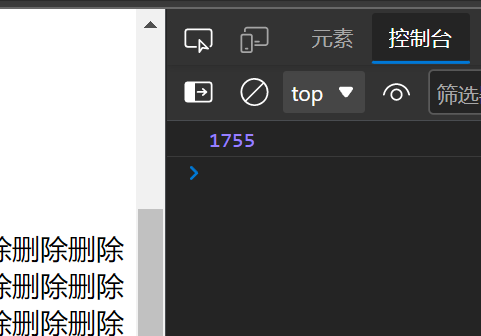
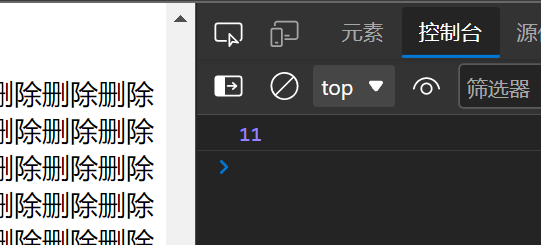
# 不同方式的区别document.write 直接将内容写入页面的内容流,但是文档流执行完毕,则它会导致页面全部重绘 innerHTML 将内容写入某个 DOM 节点,不会导致页面全部重绘 innerHTML 创建多个元素效率更高 (不要拼接字符串,采取数组形式拼接), 结构稍微复杂 createELement 创建多个元素效率稍微低一点点,但是结构更佳清晰 总结 : 不同浏览器下, innerHTML 效率要比 createElement 高
1
2
3
4
5
6
7
8
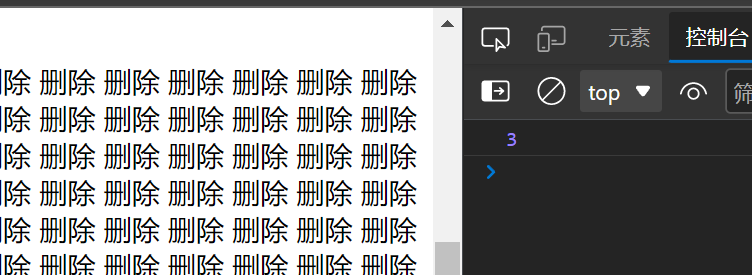
var date1 = +new Date ();var div = document .querySelector ('div' );var arrs = []for (var i = 0 ; i < 1000 ; i++) { arrs.push ('<a>删除</a>' ); } div.innerHTML = arrs.join (' ' );
数组拼接 : 用时3ms 1 2 3 for (var i = 0 ; i < 1000 ; i++) { div.innerHTML += '<a>删除</a>' ; }
拼接字符串 : 用时1755ms 1 2 3 4 5 for (var i = 0 ; i < 1000 ; i++) { var a = document .createElement ('a' ); a.innerHTML = '<a>删除</a>' ; div.appendChild (a); }
createElement添加数组